
Wednesday, April 22, 2009
HtmlDecode RSS Feed
I had to HTMLDecode the output of the ListFeed.aspx (OOTB RSS viewer within SharePoint). After digging into the SharePoint DLL's with Reflector I overwrote the render function. To make sure this change wasn't effective for the whole environment, I made a copy of ListFeed.aspx and made a custom action (as a replacement of the OOTB 'View RSS' action) to refer to the copied file.


Tuesday, April 7, 2009
Whitespace character in XSL
I noticed that wasn't working in my XSL file, used   instead and it worked like a charm.
Tuesday, March 31, 2009
How To: Change Styles Within RadEditor Field Control
I'm currently using the free RadEditor Lite. It's a cross-browser alternative to the default rich-text editor in MOSS and WSS v3. For those who don't know this HTML editor, take a look at Telerik. It's a well made alternative with some pros and cons. In this post I'll highlight one of it's cons: Styling within the RadEditor can be hard. I'm not talking about styling the skin - but especially about the font, background, etc.
I thought this was an easy task by just changing some CSS classes et voila...Not! My aim was to change the styling from within my own stylesheets. The difficulty was due to fact that the RadEditor is rendered in an IFrame.
Add an extra line: [property name="OnClientLoad"]OnClientLoad[/property]
This will tell the RadEditor to execute the OnClientLoad javascript function while loading the control.
2. Place the javascript function somewhere in a file - masterpage for instance:
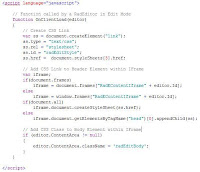 (I referenced my stylesheet with document.styleSheet[x].href and added a CSS reference in my masterpage with $SPUrl: ~SiteCollection to get a relative path to the CSS file.)
3. Create a new CSS Class, named 'redEditBody', in your referenced CSS file. Now you're able to modify his styling.
I thought this was an easy task by just changing some CSS classes et voila...Not! My aim was to change the styling from within my own stylesheets. The difficulty was due to fact that the RadEditor is rendered in an IFrame.
- My first attempt: override styles - with no result.
- My second attempt: access the IFrame and add a class on it with DOM manipulation - with no result
- Last but no least, my third attempt: access the IFrame, add a class on it and add an extra CSS Link reference in the head tag - with result.
- Modify the ConfigFile.xml
- Write some javascript to access and manipulate the IFrame
- Create a CSS Class / File
Add an extra line: [property name="OnClientLoad"]OnClientLoad[/property]
This will tell the RadEditor to execute the OnClientLoad javascript function while loading the control.
2. Place the javascript function somewhere in a file - masterpage for instance:
 (I referenced my stylesheet with document.styleSheet[x].href and added a CSS reference in my masterpage with $SPUrl: ~SiteCollection to get a relative path to the CSS file.)
3. Create a new CSS Class, named 'redEditBody', in your referenced CSS file. Now you're able to modify his styling.
Sunday, March 22, 2009
How To: Pass parameters to XSL with CQWP
I build a customized CQWP to add paging (without using connectable webparts) and some filter options. I needed some information in the XSL about the amount of pages, current pagenumber, ... to build up the paging. That kind of information was available in my CQWP class but I had no idea how to access them from within my XSL. After some google research I found an excellent article of Waldek Mastykarz that helped me a lot.
Monday, March 2, 2009
The Facebook Kit for SharePoint
 I don't have to tell you that Facebook is hot these days... As expected, the hype has reached SharePoint. I think this kit has a lot of potential to leverage a surplus value for the social networking aspect in SharePoint.
The Facebook Kit for SharePoint (FKS) leverages the Facebook Connect API to bring to your end users fingers tips great web parts that will help make your SharePoint sites more "Social" and integrated with Facebook!
Download the Facebook kit here...
Related webparts: SharePoint FaceBook/Smoelenboek WebParts
Related source: White paper: Managing social networking with Microsoft Office SharePoint Server 2007
Thursday, February 26, 2009
No searchresults for content available in welcome pages
I wrote a custom multilingual searchwebpart which uses the FullTextSqlQuery class to execute a search query. The webpart is used in a WCM scenario and his task was to find all publishing pages related with the given keyword.
After a while I noticed something weird... the webpart could find all keywords available in various fieldcontrols except for those content available in welcome pages.
After some research, it seems to be a SP bug. Thank goodness, MS has already released a hotfix package for this.
After a while I noticed something weird... the webpart could find all keywords available in various fieldcontrols except for those content available in welcome pages.
After some research, it seems to be a SP bug. Thank goodness, MS has already released a hotfix package for this.
Monday, February 2, 2009
Peekaboo Bug: IE7
I ran across an ugly IE bug while developing a page layout. After some research it seems to be a crazy-making "peekaboo" IE bug.
Certain content mysteriously disappears when you take some mouse action.
In my case it looks like this:

Cause:
Setup of floating elements
Fix:
You have to set the "Layout" for the DIV element. You can set "Layout" in different manners eg. position, zoom, height,... attribute.
Peekaboo (also spelled Peek-a-boo) is a game similar to hide and seek, but played with babies. In the game, one child, teenager, or adult hides their face, pops back into the baby's view, and says — to the baby's amusement Peekaboo! I see you!Symtoms:
Certain content mysteriously disappears when you take some mouse action.
In my case it looks like this:

Cause:
Setup of floating elements
Fix:
You have to set the "Layout" for the DIV element. You can set "Layout" in different manners eg. position, zoom, height,... attribute.
The hasLayout MS-property is a sort of flag: when it is set, the element has this layout “quality”, which includes special capabilities — for instance, on the floating and stacking — for the element itself and for its non-layouted child elements.Some more information about hasLayout: The concept of hasLayout in IE/Win.
Subscribe to:
Posts (Atom)